
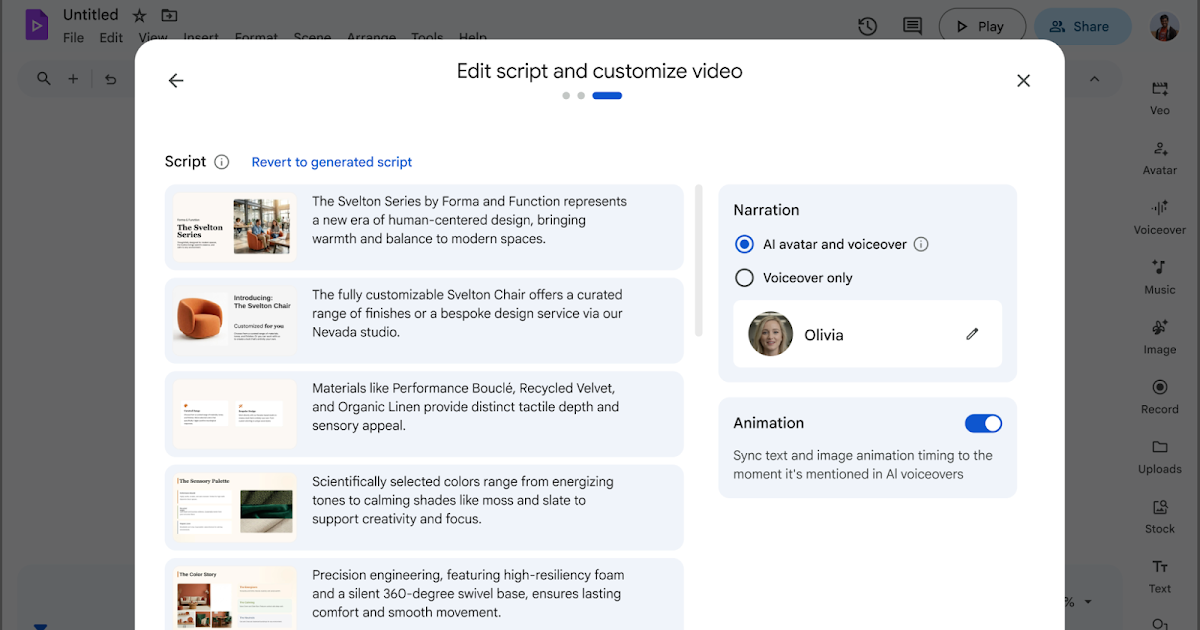
You can already convert your Google Slides content into Google Vids, and use Gemini to generate scripts, voiceovers, and background music. Now, you can add a spokesperson to your videos using AI avatars when importing content from Slides. Avatars are dynamically inserted throughout the imported slides to make the generated Vid feel more relatable and engaging.
 |
| Turning a Slides presentation into a Vid with an avatar |
Getting started
- Admins: There is no admin control for this feature.
- End users: There is no end user setting for this feature. Visit the Help Center to learn more about converting Google Slides into Google Vids.
Note: Through July 1, 2026, Workspace customers will get promotional access to higher limits for adding avatars when converting presentations to Vids, allowing users to experiment with this feature. Per-user usage limits will apply after that date; we’ll provide more information in the Help Center in advance of updated usage limits going into effect.
Rollout pace
- Rapid Release domains: Gradual rollout (up to 15 days for feature visibility) starting on May 11, 2026
- Scheduled Release domains: Full rollout (1–3 days for feature visibility) starting on June 1, 2026
Availability
- Business: Business Starter*, Standard, and Plus
- Enterprise: Enterprise Starter*, Standard, and Plus
- Education: Education Plus*
- Consumer: Google AI Pro and Ultra
- Other Editions: Nonprofits*
- Education Add-ons: Google AI Pro for Education; Teaching and Learning*
- Other Add-ons: AI Expanded Access
*For a limited time, at least through May 31, 2026, Business Starter, Enterprise Starter, Education Plus, Nonprofits, and Teaching and Learning add-on accounts can access generative AI features in Vids. Learn about Google Vids availability.
Resources
- Google Help: Convert Google Slides into Google Vids