
We’re introducing enhancements to the Google Meet starter step in Google Workspace Studio. As part of this, the step When a meeting transcript is ready has been renamed When meeting outputs are ready. This step now allows you to decide if the workflow should run when either meeting transcripts or Notes by Gemini are ready. Previously, only meeting transcripts would trigger the flow to run.
In addition, you can now select up to 100 different meetings to trigger your flow whereas in the past you could only select one meeting. This update allows you to easily automate the same process for multiple events.
 |
| Use the updated “When meeting outputs are ready” starter step |
With these enhancements, you gain greater precision in managing which meeting artifacts and which specific meetings activate your workflow.
Block time on your calendar
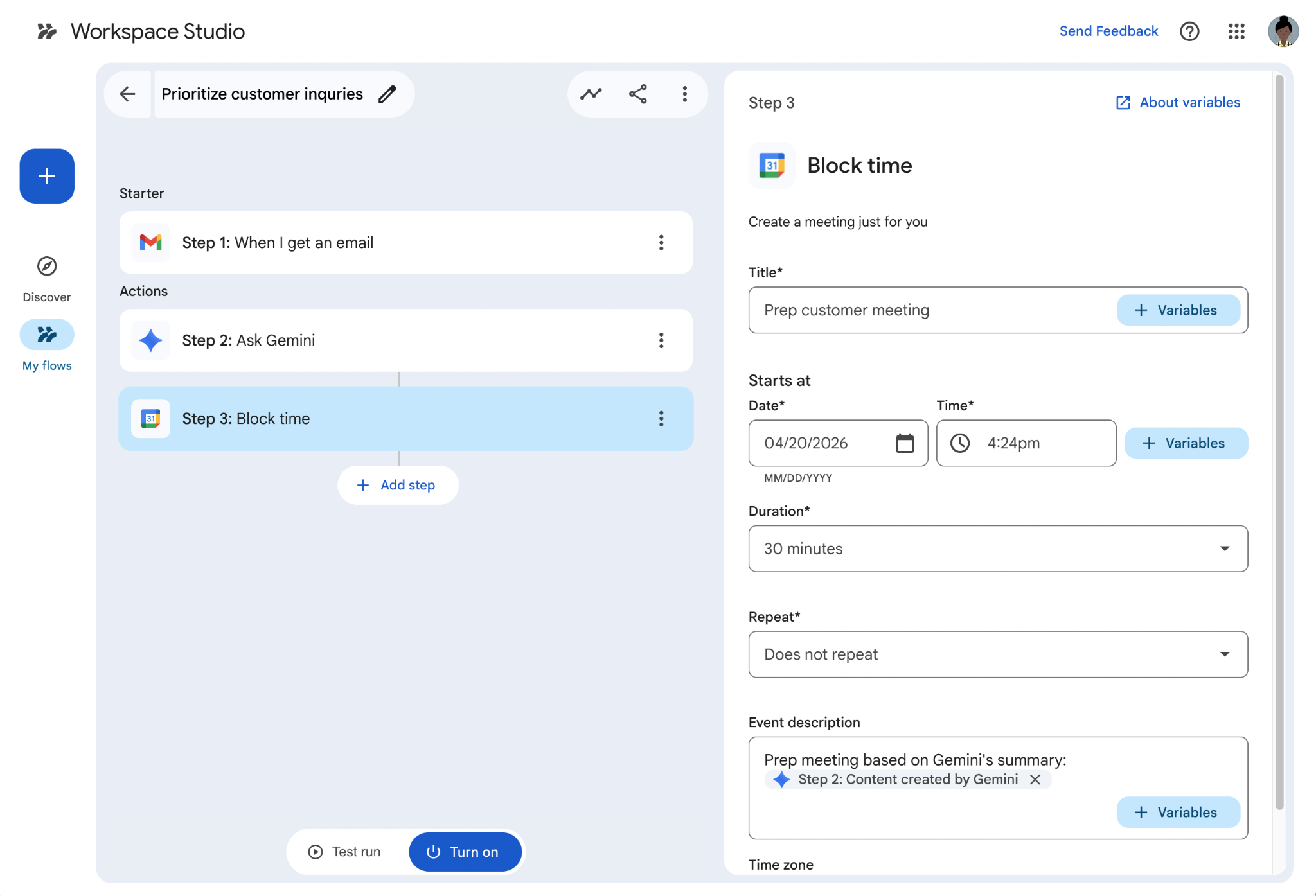
We’re also making it possible for Workspace Studio flows to block time on your calendar.
You can use the “Block time” step with “Ask Gemini” or “Extract” steps to automate use cases like adding a reminder block on your calendar for an appointment confirmation or required training you received in email, or to schedule focus time. The event the flow creates is just for you and no guests can be added.
 |
| Use the “Block time” step to create an event for you in your calendar |
Getting started
- Admins: There is no admin control for this feature. VIsit the Help Center to learn more about managing access to steps and starts in Workspace Studio.
- End users: Try the feature in Google Workspace Studio. Visit the Help Center to learn more about the Meet starter step and the Block time step.
Rollout pace
- Rapid Release and Scheduled Release domains: Full rollout (1–3 days for feature visibility) starting on May 6, 2026
Availability
- Business: Business Starter, Standard, and Plus
- Enterprise: Enterprise Standard and Plus
- Education: Education Fundamentals, Standard, and Plus
- Education Add-ons: Google AI Pro for Education; Teaching and Learning
- Other Add-ons: AI Expanded Access*
*Starting June 1, 2026, users with AI Expanded Access licenses will have higher limits on usage of Workspace Studio.
Resources
- Google Workspace Admin Help: Workspace Studio admin help
- Google Help: Get Started with Workspace Studio
- Google Workspace Learning Center: Workspace Studio training and help
- Google Workspace Blog: Introducing Google Workspace Studio: Automate everyday work with AI agents
- YouTube: Google Workspace Studio video playlist
- Discord Channel: Google Workspace Studio Discord