
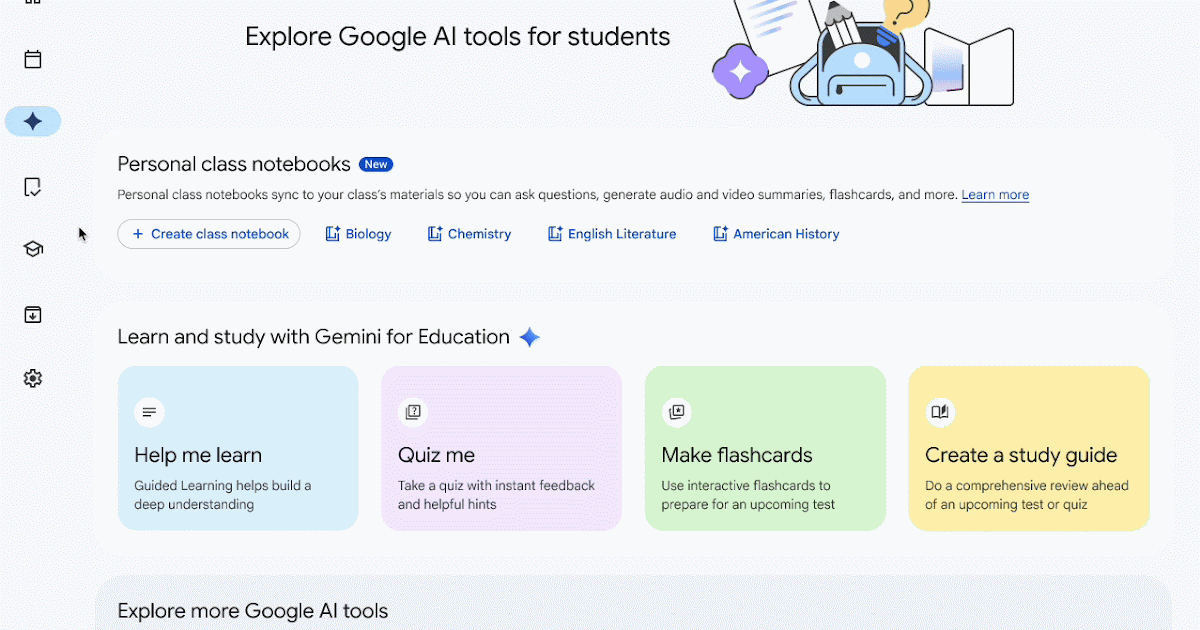
Last year, we announced that educators can use NotebookLM to create teacher-led AI experiences for students in Google Classroom, based on their class materials. Since then, students have been able to access their teachers’ interactive study guides and other learning aids created with NotebookLM for extra practice, support, and learning opportunities. Today, we’re allowing students in higher education who are 18 years of age and older to create their own notebooks for courses in Google Classroom.
From the Gemini tab in Google Classroom, students can use NotebookLM to create a personal class notebook that is grounded in the materials provided by their educator. Personal class notebooks can transform how students interact with these class resources, unlocking new ways to build understanding by converting class materials into interactive and multi-modal study tools. This can help students with:
- Creating custom study tools: Students can use the « Studio » panel within their notebook to generate various high-value outputs, including Audio Overviews (podcast-style summaries), Video Overviews, study guides, flashcards, and interactive visual diagrams.
- Summarizing and synthesizing: Students can quickly synthesize information across up to 50 source documents per notebook, making it easier to prepare for exams or catch up on missed lessons.
- Direct-to-student support: By using the Gemini tab directly in Classroom, students can ask questions and get grounded answers based strictly on their class content, ensuring help is relevant and reliable.
- Enhanced creativity: Students can go beyond text by creating infographics, slide decks, and other visual aids to help them internalize and present what they’ve learned.
This feature will roll out on the web first, with mobile following in the coming weeks.

Getting started
- Admins: To access and create notebooks in Classroom, students must also be in a group or OU with Gemini, NotebookLM, and Gemini in Classroom set to On. Use our Help Center to learn more about turning Gemini on or off for users, turning NotebookLM on or off for users, and managing access to Gemini in Classroom.
- Note: Ensure roles in Classroom are appropriately assigned to users. Learn more about teacher and student roles here.
- End users:
- This feature is ON by default for users whose role is defined as “Student” in Classroom, are 18 years or older, are in a higher education organization, and are in a group or OU with Gemini, NotebookLM, and Gemini in Classroom set to On.
- To create a personal class notebook in Classroom, students can navigate to the Gemini tab in the navigation bar in Google Classroom > Personal class notebooks > Create class notebook. In NotebookLM, a new tab will open where students can edit the notebook and its source materials.
- Students will continue to have access to teacher-created notebooks from the Classwork item that the teacher attached it to. Students may also see these at the top of the Classwork page if the teacher selects the option to ‘highlight at top of Classwork.’
- Visit our Help Center to learn more about using NotebookLM in Classroom:
Rollout pace
- Rapid Release and Scheduled Release domains: Full rollout (1–3 days for feature visibility) starting April 27, 2026
Availability
- Education: Education Fundamentals, Standard, and Plus
Resources
- Google Workspace Updates Blog: Educators can now create and assign NotebookLM and Gems in Google Classroom
- Google Workspace Updates Blog: Gemini in Google Classroom is expanding to students in higher education
- Google Help: Explore NotebookLM & Gems assigned to you in Google Classroom
- Google Help: Create Assignments with NotebookLM & Gems in Google Classroom
- Google Workspace Admin Help: Turn NotebookLM on or off for users
- Google Workspace Admin Help: Turn the Gemini app on or off